
ON THIS PAGE
Create an API key
An API key lets another system call Redlist as an integration, with only the permissions you choose. The REST API, GraphQL, webhooks and Zapier all use it. Each key belongs to one Redlist account.

Do it in Redlist
1. Sign in to the Redlist account the integration is for, then go to Admin › Integration Hub.
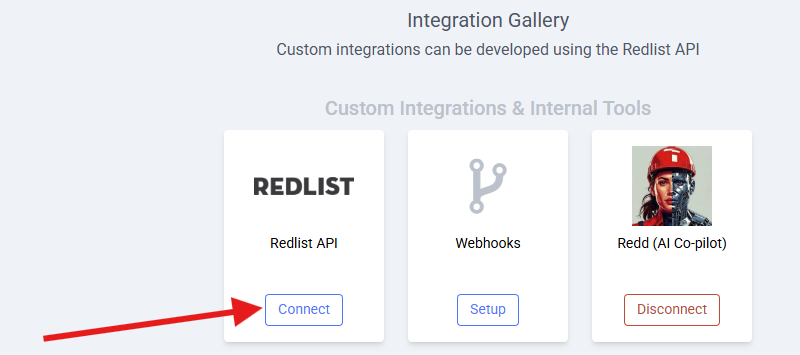
2. In the Integration Gallery, find Redlist API under Custom Integrations & Internal Tools and select Connect.
3. Give it a description your team will recognise, like "ERP work order sync", and select Next.
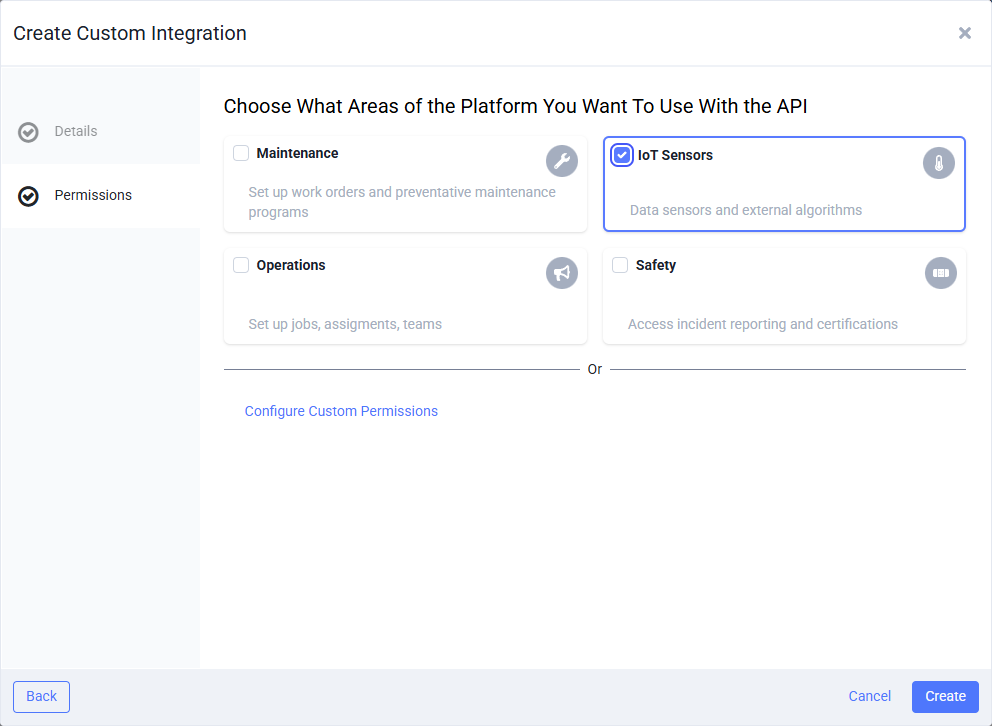
4. Choose the areas it can use (Maintenance, IoT Sensors, Operations or Safety), or select Configure Custom Permissions to pick exact permissions, then select Create. Webhooks and Zapier need the webhook permission, which the Maintenance and Operations areas include.
5. Copy the API key, secret and shard ID into your password manager or secrets store.
Ready? Open it in Redlist:
Use it
Send all three values as headers on every request:
apiKey: $REDLIST_API_KEY
vaultSecret: $REDLIST_SECRET
shardID: $REDLIST_SHARD_ID
To check a key works and see what it can do, call GET api/Me. It returns the account, the integration name and its permissions.
To change a key's permissions or turn it off, open the integration in the Integration Hub. Manage integrations in Redlist ↗
Next
← Previous: Overview Next: Rate limits & errors →